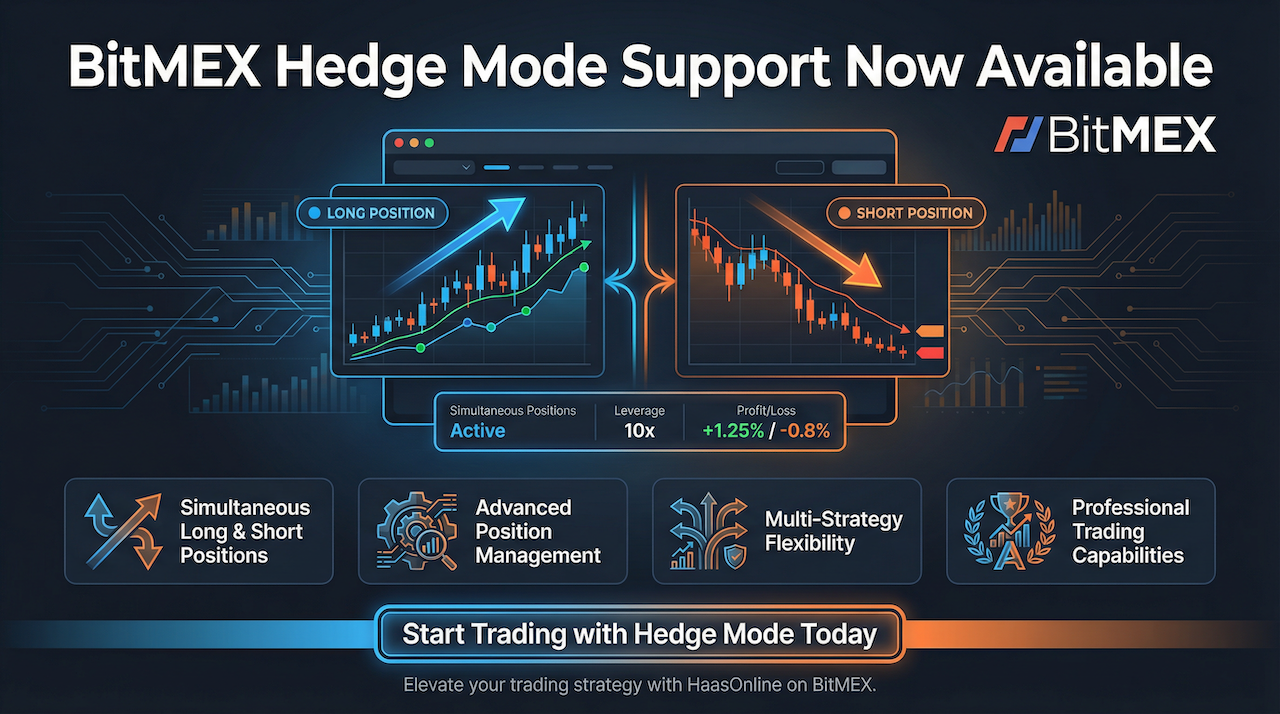
HaasOnline is excited to announce support for BitMEX Hedge Mode, giving traders greater flexibility to manage complex multi-strategy positions on the same contract.
This enhancement expands trading capabilities on BitMEX, allowing automated bots to hold both long and short positions simultaneously—unlocking sophisticated trading strategies that were previously impossible.
Important: HaasOnline TradeServer is a non-custodial trading automation framework. Users design and implement their own trading logic using their own exchange accounts. This article describes technical capabilities only—not trading advice or strategy recommendations.
What is BitMEX Hedge Mode?
BitMEX Hedge Mode is an advanced position management feature that allows traders to hold both long and short positions simultaneously on the same contract. This differs from the traditional one-way mode, where opening a position in the opposite direction automatically closes your existing position.
With hedge mode enabled, you can maintain separate long and short positions on the same trading pair, each with independent entry prices, stop-losses, and take-profit levels.
Why Hedge Mode Matters
Hedge mode unlocks sophisticated trading strategies that were previously impossible with traditional position management:
- True Hedging: Protect existing positions from short-term volatility without closing existing trades
- Simultaneous Strategies: Run long-term trend-following and short-term mean-reversion strategies on the same contract
- Risk Management: Reduce directional exposure while maintaining market presence
- Scalping Flexibility: Take quick counter-trend scalps without affecting primary positions
- Funding Rate Arbitrage: Monitor funding rate differentials while maintaining delta-neutral positions
- Multi-Timeframe Trading: Execute strategies across different timeframes without position conflicts
Hedge Mode vs One-Way Mode
Understanding the difference between these position modes is critical for strategy design:
One-Way Mode (Traditional)
- Single position per contract (either long or short)
- Opening opposite position automatically closes existing position
- Simpler P&L calculation
- Ideal for directional strategies
- Lower complexity for beginners
Hedge Mode (Advanced)
- Separate long and short positions on the same contract
- Positions are independent and can be closed separately
- Requires separate stop-loss and take-profit management for each side
- Enables complex multi-strategy approaches
- Net position determines overall exposure
- Better suited for experienced traders running multiple strategies
Configuring BitMEX Hedge Mode in HaasOnline
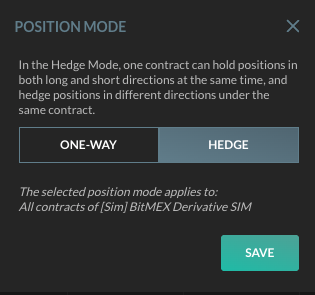
HaasOnline TradeServer allows you to configure hedge mode directly within the platform. To enable hedge mode:
- Open HaasOnline TradeServer (Cloud or self-hosted TradeServer)
- Navigate to the Execute Trade screen for your BitMEX account
- Click on Position Mode
- Select HEDGE instead of ONE-WAY
- Click SAVE to apply the changes
- Your bots will now support simultaneous long/short positions on the same contract
Important: Changing position modes affects how orders interact with existing positions. Review your active strategies before switching modes and ensure you understand how hedge mode will impact your position management.
Hedge Mode Strategy Examples
Note: The following are educational examples only, not recommendations. Users are responsible for designing and testing their own trading strategies.
Examples of how traders have configured hedge mode with HaasOnline automation:
Strategy 1: Long-Term Hold with Short-Term Hedges
Maintain a long position based on daily or weekly trends while taking short positions to hedge against intraday volatility or news events. This allows you to protect your long-term conviction trade without closing it during temporary market corrections.
Strategy 2: Dual-Timeframe Trading
Run a long-term trend-following bot on the 4-hour chart while simultaneously executing a mean-reversion strategy on the 15-minute chart. Each strategy can hold its own position without interfering with the other.
Strategy 3: Funding Rate Arbitrage
Hold equal long and short positions (delta-neutral) to collect funding rate payments without directional exposure. This approach is commonly used by traders during periods of extreme funding rates on BitMEX.
Strategy 4: Volatility Scalping
Maintain a primary directional position based on your market outlook, while using a separate bot to scalp volatility spikes in the opposite direction. This trading activity can help manage exposure on your main position during ranging markets.
Bot Configuration for Hedge Mode
When using hedge mode with HaasOnline bots, consider these common configuration approaches:
- Separate Bots: Use different bot instances for long and short strategies to avoid conflicts
- Independent Risk Settings: Configure stop-loss and take-profit independently for each position direction
- Position Sizing: Remember that hedge mode can double your exposure—size positions accordingly
- Monitor Net Exposure: Track your combined position to understand true directional risk
- Test First: Always use paper trading mode to test hedge mode strategies before deploying real capital
Risk Management Considerations
Hedge mode provides powerful capabilities but requires disciplined risk management:
- Position Sizing: Hedge mode can double your exposure if both long and short positions are open—size accordingly to avoid exceeding your risk tolerance
- Stop-Loss Discipline: Each position in hedge mode needs independent stop-loss protection. A catastrophic move could trigger stops on both sides.
- Funding Rate Costs: Holding positions in both directions means paying funding rates on both sides—monitor these costs carefully
- Liquidation Risk: Each position has its own liquidation price. Ensure you have sufficient margin for both positions during volatile markets.
- Complexity Management: Multiple simultaneous positions require more attention and monitoring than single-direction trading
- Exchange Limits: Be aware of BitMEX's position limits and API rate limits when running multiple automated strategies
- Paper Trading First: Always test new hedge mode strategies without risk before deploying capital
Getting Started with Hedge Mode
- Create or log into your BitMEX account
- Connect your BitMEX account to HaasOnline TradeServer (Cloud or self-hosted TradeServer)
- Enable hedge mode in the Execute Trade screen (as shown above)
- Design or adapt your trading strategies to leverage simultaneous long/short positions
- Test thoroughly in paper trading mode to understand how positions interact
- Start with smaller position sizes when first using hedge mode with real capital
- Monitor your net exposure and risk metrics closely
About BitMEX
BitMEX is a leading cryptocurrency derivatives exchange offering perpetual and futures contracts with up to 100x leverage. Known for deep liquidity, advanced order types, and institutional-grade infrastructure, BitMEX serves professional traders worldwide.
BitMEX pioneered cryptocurrency perpetual swaps and continues to be a preferred platform for professional derivatives traders seeking advanced features like hedge mode, portfolio margin, and high-leverage products.
Start Trading with Hedge Mode Today
Ready to unlock advanced multi-strategy trading with BitMEX hedge mode? Create your BitMEX account and connect it to HaasOnline TradeServer Cloud or self-hosted TradeServer to deploy sophisticated automated trading strategies.
Hedge mode support is available now in both Cloud and self-hosted editions of HaasOnline TradeServer. Upgrade your trading automation and take advantage of advanced position management capabilities.
Disclaimer: HaasOnline provides trading automation software only. This article is for informational purposes and does not constitute investment advice, trading recommendations, or any form of financial guidance. The software is provided as-is without performance guarantees. Users bear all trading risk and are solely responsible for their trading decisions. No fiduciary relationship exists between HaasOnline and users. Trading with leverage carries significant risk and may not be suitable for all investors. Users should understand the risks involved in cryptocurrency trading, particularly when using advanced features like hedge mode. Past performance does not guarantee future results.