
The HaasOnline public REST API is live. Create a key in Settings, choose what it may touch, and drive your bots, scripts, backtests, labs and orders from your own code. Documentation is at docs.haasapi.com.
HaasOnline has had an API for as long as it has had a product - the web app talks to one - but it was never documented for anyone else, and its shapes were ours, not yours. Today's release is a clean, versioned, documented surface at https://rest.haasapi.com/v1/ built for people who write code: bearer keys with scopes, RFC 9457 errors, cursor pagination, rate limits you can read from headers, and snake_case JSON that looks the same in every response.
Who this is for
- Traders with their own tooling. A dashboard, a spreadsheet, a Telegram bot that reports P&L - anything that wants your bots' state without scraping the UI
- Quant workflows. Push a script from your editor, run a backtest, read the positions, iterate, all from a notebook or a CI job
- AI agents that need more than conversation. Our MCP server is deliberately unable to trade or start bots. If your agent needs to, it uses this API with a key you scoped for it (more on that below)
- People moving off other bot platforms who automated them by API and want the same on HaasOnline
Creating a key
Open Settings → API Keys in HaasOnline TradeServer Cloud and create a key. Three things on that form matter:
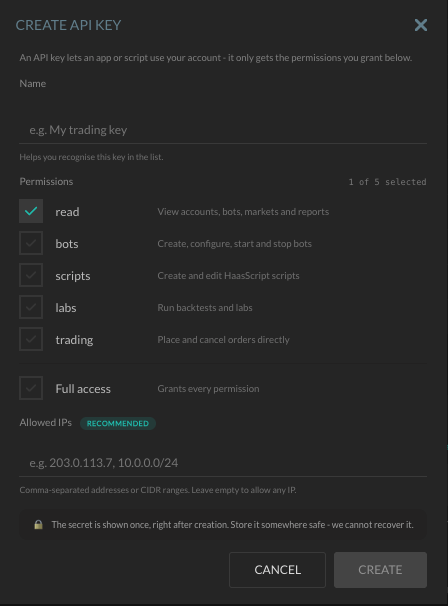
- Permissions are scopes, and you pick them per key.
readsees accounts, bots, markets and reports.botscreates, configures, starts and stops bots.scriptswrites HaasScript.labsruns backtests and labs.tradingplaces and cancels orders directly. A reporting dashboard getsreadand nothing else; an agent gets exactly the scopes you are comfortable handing it - Allowed IPs. Optional, recommended, and the single most effective thing you can do for a key that lives on a server: a leaked key that only works from your VPS is a much smaller problem
- The secret is shown once. Keys start with
hk_live_. Store it at creation; we cannot recover it, only revoke it
Your first request
curl "https://rest.haasapi.com/v1/markets?exchange=BINANCE" \
  -H "Authorization: Bearer hk_live_YOUR_KEY"
That is the whole authentication model: one header, one key. There is no signing, no timestamp, no nonce.
What is in v1 today
| Resource | Endpoints | Scope |
|---|---|---|
| Markets | List exchanges, list markets | read |
| Accounts | List accounts, balance, open orders, open positions | read |
| Bots | List, get, create, delete, start, stop | read / bots |
| Scripts | List, get, create, delete, update source | read / scripts |
| Backtests | Run, status, logs, positions, delete | read / labs |
| Labs | List, get, start, cancel | read / labs |
| Trading | Place an order, cancel an order | trading |
Twenty-eight endpoints, which is the core of what the app does day to day. The stated direction is parity: anything you can do in the HaasOnline interface should eventually be possible here, shipped in tranches. The full list with request and response shapes is in the API reference.
Conventions worth knowing
- Errors are RFC 9457 problem documents (
application/problem+json) with a stable snake_casecodesuch asexchange_not_foundorrate_limited, a humandetailthat may change, and aninstancerequest id to quote to support. Branch oncode, never ondetail. Every code has its own page under docs.haasapi.com/errors - Cursor pagination on list endpoints; timestamps are RFC 3339; decimals are strings, so a price is
"0.00001234"and never a float that has already lost digits - Rate limits are per key and readable from headers. Reads 120 per minute, writes 60 per minute, order placement 60 per minute, expensive operations (backtests, lab starts) 20 per hour. Responses carry standard
RateLimitheaders plus theX-RateLimit-*family, and a 429 comes withRetry-After. Respect it; retry storms get you nothing sooner
REST or MCP?
We now have two ways for software to reach your account, and they are intentionally different.
The MCP server is for assistants in conversation - Claude, Codex, Cursor, VS Code. It authenticates with a one-click OAuth flow and it cannot place or cancel a trade, or start and stop a bot; those tools do not exist in that interface. That is the right shape for something that reads your bots and drafts scripts while you talk to it.
The REST API is for code you wrote and run. With the bots and trading scopes it can do those things, because a scheduled job or a risk script sometimes has to. The key is yours, the scopes are yours, and the IP allowlist is yours. If you are building an agent that needs to act, give it a REST key with the narrowest scopes that work and an allowlist, and keep the MCP connection for the conversation.
What is not there yet
- No webhooks. Long-running work (backtests, labs) is polled through its status endpoint. Webhooks are planned; the job resources are shaped so that adding them will not break you
- No streaming. There is no WebSocket surface on this API yet
- Personal keys only. There are no third-party OAuth apps; a key belongs to a HaasOnline account and acts as that account
Availability
API keys are available on the Standard, Pro and TradeServer plans, and during the free trial, so you can build against it before deciding anything. It is not included on Starter.
Partners who run HaasOnline bots for their own users have a separate White Label API on the same host.
A word on safety
An API key with the trading scope can move your money on the exchange, within whatever your exchange keys allow. Treat it like the exchange key itself: scope it down, pin it to an IP, keep it out of browser code and public repositories, and revoke it the moment you are unsure where it has been. Everything a key does runs under your account and shows up in the same bot logs and order history you already have.
Read the documentation and make your first request, or start a free 7-day trial if you are new to HaasOnline.
Disclaimer: HaasOnline provides trading automation software only. This article is for informational purposes and does not constitute investment advice, trading recommendations, or any form of financial guidance. Users are solely responsible for their trading decisions and for the security of their API keys, and should understand the risks involved in cryptocurrency trading. Past performance is not indicative of future results, and only deploy capital you can afford to have at risk.