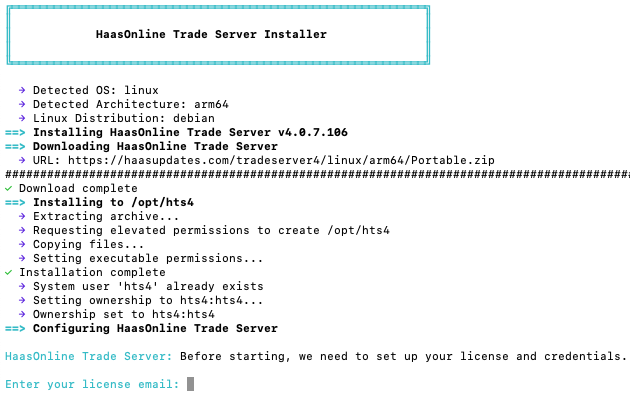
Installing TradeServer doesn't have to be complicated. Whether you're running HaasOnline TradeServer on a Mac or Linux system, our new automated installation script makes deployment as simple as running a single command.
One Command, Multiple Platforms
We've designed our TradeServer installer with simplicity in mind. No matter which operating system you're using, the installation process is exactly the same: just one command that works seamlessly across macOS (both Intel and Apple Silicon) and all major Linux distributions.
The script intelligently detects your system architecture and handles everything automatically. Access the installation script and instructions from your account dashboard.
A Smart Installation Process
Behind the scenes, our installer does the heavy lifting so you don't have to. Here's what happens when you run the script:
Automatic System Detection
The installer automatically identifies your operating system and processor architecture. Whether you're running on an M1 Mac, an Intel-based Linux server, or an ARM-based cloud instance, the script ensures you get the correct version of TradeServer for your hardware.
Clean and Organized Installation
HaasOnline TradeServer installs neatly into a dedicated directory at /opt/hts4, keeping your system organized and making it easy to manage. The installer also creates a convenient launcher at /usr/local/bin/hts4, so you can start TradeServer from anywhere on your system.
TradeServer Features
The installer includes several features designed specifically for TradeServer deployments:
SSL Configuration Made Easy
Security is paramount when running trading infrastructure. Our installer can automatically configure SSL certificates for secure connections. You can choose between Let's Encrypt certificates (automatically managed and renewed) or self-signed certificates for internal deployments.
Interactive and Silent Modes
For hands-on installation, the script guides you through each step with clear prompts and color-coded output. For automated deployments across multiple servers, it supports non-interactive mode for scripting and automation.
Built for Reliability
The installer is designed to handle edge cases gracefully. It checks for common issues before proceeding, validates downloads to ensure file integrity, and provides clear error messages if something needs your attention. The color-coded terminal output makes it easy to spot important information at a glance.
Getting Started
Ready to deploy HaasOnline TradeServer on your infrastructure? Visit your account downloads page to access the installation script and complete instructions. Simply copy the command, run it in your terminal, and the script will guide you through the process. You'll be up and running in minutes.
For existing installations, running the installer again is the easiest way to update to the latest version. Your configuration and data are preserved automatically.
TradeServer Support and Licensing
The installer handles the software deployment, but you'll need an active HaasOnline license to run TradeServer. Visit our pricing page to explore our TradeServer licensing options, or contact our team to discuss custom deployments for your organization.
Whether you're running a single instance for your trading operations or deploying across multiple servers for a trading desk, our installation script makes it simple to get started and stay updated.