Differences between HaasScript and Visual HaasScript
Differences Between HaasScript and Visual HaasScript
HaasOnline supports two distinct approaches to creating trading strategies: writing code directly in HaasScript, or building strategies visually using the Visual HaasScript editor. Both methods give you access to the same HaasScript commands and capabilities—your choice depends on your experience level and personal preference.
Code-Based HaasScript
HaasScript is a Lua-based scripting language where you write trading logic as traditional code.
How It Works
You write commands and logic line-by-line using text, just like any programming language:
-- Define parameters
local rsiPeriod = Input("RSI Period", 14)
local buyLevel = Input("Buy Level", 30)
local sellLevel = Input("Sell Level", 70)

-- Calculate indicator
local rsi = RSI(ClosePrices(), rsiPeriod)

-- Execute trades
if rsi < buyLevel then
    DoLong("RSI oversold")
elseif rsi > sellLevel then
    DoShort("RSI overbought")
end
Advantages
- Complete control over every aspect of your strategy logic
- Faster for experienced programmers who are comfortable with code
- Easier to maintain complex strategies with multiple conditions
- Better for copy-pasting code examples from documentation and community scripts
- More efficient for strategies with extensive logic or calculations
- Standard programming workflow that translates to other languages
Who Should Use It
- Traders with prior programming experience
- Those who prefer direct control over logic structure
- Strategies with complex mathematical or conditional logic
- Anyone planning to extend existing scripts or use community code
Visual HaasScript
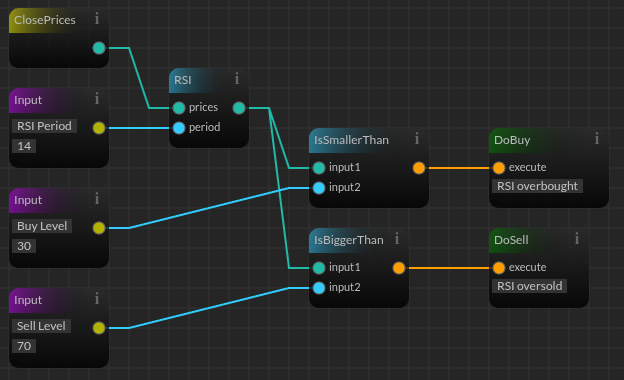
Visual HaasScript uses a node-based interface where you build strategies by connecting blocks that represent commands and data flow.
How It Works
You drag and drop nodes representing HaasScript commands, then connect them to define logic flow:
Advantages
- No programming required - accessible to non-programmers
- Visual logic flow makes strategy structure immediately apparent
- Easy to experiment by rearranging nodes and connections
- Great for learning how HaasScript commands work together
- Quick prototyping of simple strategies without writing code
- Reduces syntax errors since nodes enforce correct command usage
Who Should Use It
- Traders without programming experience
- Those who prefer visual representation over code
- Simple to moderate complexity strategies
- Learning and experimentation with HaasScript commands
Key Differences
Workflow
| Aspect | Code HaasScript | Visual HaasScript |
|---|---|---|
| Input method | Type commands textually | Drag and drop nodes |
| Logic structure | Sequential lines | Visual connections |
| Error detection | Runtime errors or syntax highlighting | Connection validation |
| Learning curve | Steeper if new to programming | Gentler for visual thinkers |
| Speed for complex logic | Faster once proficient | Can become cumbersome |
Capabilities
Both approaches have identical capabilities:
- Access all 600+ HaasScript commands
- Create complex trading strategies
- Use all technical indicators and trading functions
- Implement risk management and position sizing
- Backtest and deploy to live markets
The visual editor is not a simplified subset—it gives you access to the same commands and logic as the code editor, just through a different interface.
Custom Commands Work Across Both Modes
Scripts created in the code editor cannot be converted to visual node-based scripts, and vice versa. Each mode produces its own output and they do not automatically generate or translate into each other.
However, custom commands are the bridge between the two. If you create a custom command using DefineCommand(), it becomes available in both editors:
- In the visual editor, your custom command appears as a draggable node in your command library
- In the code editor, your custom command appears as an auto-completed function you can call directly
This means you can build a reusable piece of logic in whichever mode you prefer, then use it in the other mode without rewriting anything.
Which Should You Choose?
Start with Visual HaasScript If You're New to Coding
The visual editor is the fastest way to start building working strategies without learning programming syntax. You'll learn HaasScript commands and logic flow by experimenting with node connections.
Start with Code HaasScript If You Have Programming Experience
If you've worked with Lua, Python, JavaScript, or similar languages, diving straight into code will be more efficient.