Batchtesting with HaasLabs
Batchtesting with HaasLabs
A single backtest tells you how one configuration performed. But what if the optimal timeframe is 30 minutes instead of 15? What if a different RSI length would have doubled your returns? Answering these questions manually means running dozens or hundreds of backtests one at a time. HaasLabs automates this.
What Is HaasLabs?
HaasLabs (Backtest Labs) runs a parameter sweep across your script's settings. You define which parameters to vary and their ranges, and the lab runs a backtest for every combination in parallel. The results are sorted and ranked so you can identify the best configuration without manual trial and error.
Example: instead of guessing the right timeframe and RSI length, you tell the lab to test four timeframes (15m, 1h, 4h, 12h) and six RSI lengths (9 to 24, step 3). The lab runs 4 × 6 = 24 backtests and shows you which combination produced the highest ROI.
Access HaasLabs from the sidebar under HaasScript > Backtest Lab.
Creating a Lab
Step 1: Name and Script
Click Create your first lab from the landing page. The New Lab Config modal opens:
- Enter a Name for the lab (e.g., "My lab")
- Click Next
The Select Script modal appears. Choose the script you want to optimize. Use the sidebar to filter:
- All -- every script available
- Favorites -- scripts you starred
- Built-in -- HaasOnline original scripts
- Custom -- scripts you wrote
Select a script and proceed to the lab configuration page.
Configuring the Lab
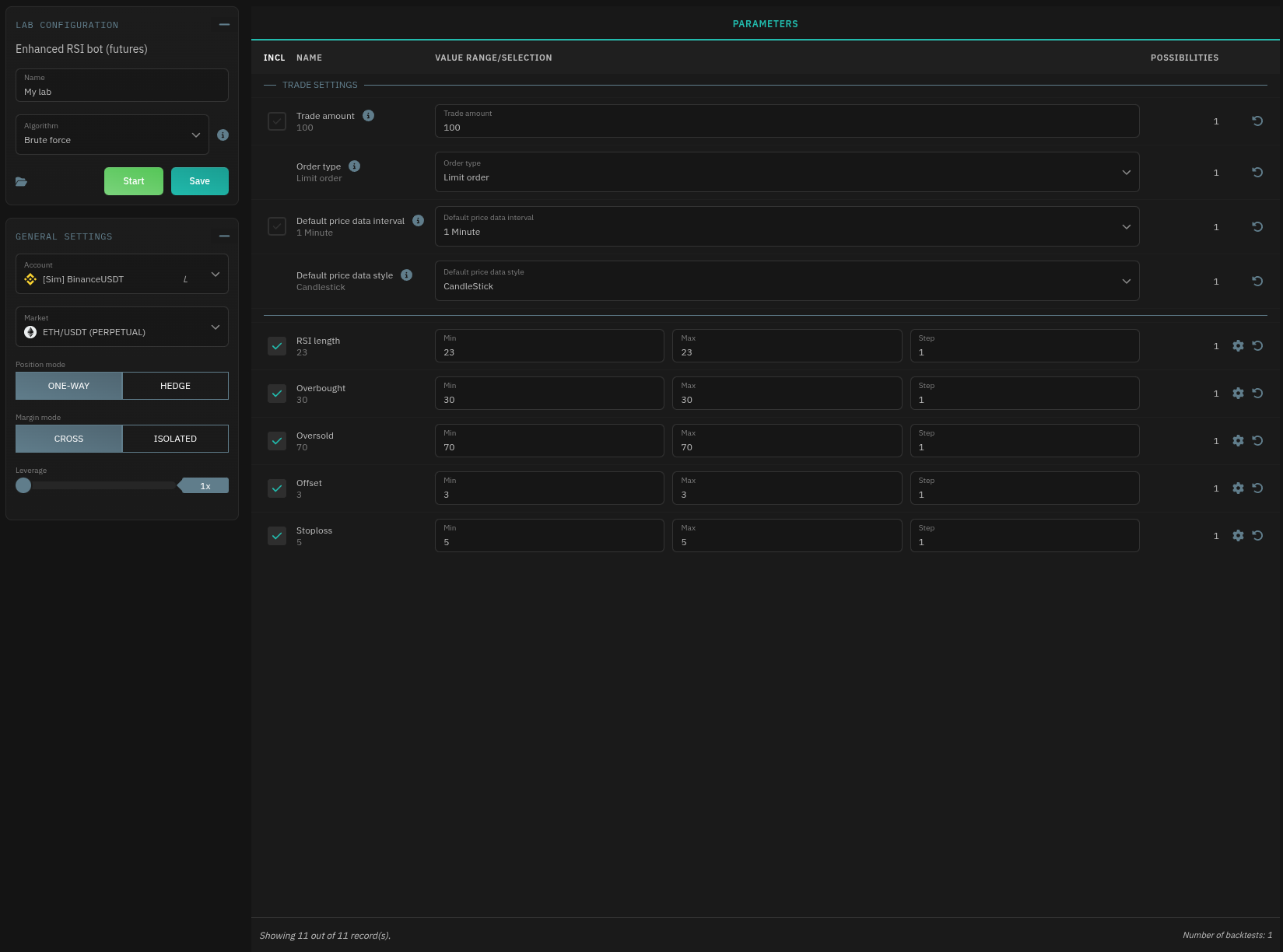 The lab configuration page has two panels: Lab Configuration and General Settings on the left and Parameters on the right.
Lab Configuration
Algorithm -- Choose how the lab explores parameter combinations:
| Algorithm | Behavior |
|---|---|
| Brute Force | Tests every possible combination exhaustively. Guaranteed to find the best result within your defined ranges, but can take a long time with many combinations. |
| Intelligent | Uses a genetic algorithm that evolves parameters over generations. Faster for large parameter spaces, but may not explore every combination. |
Intelligent algorithm settings:
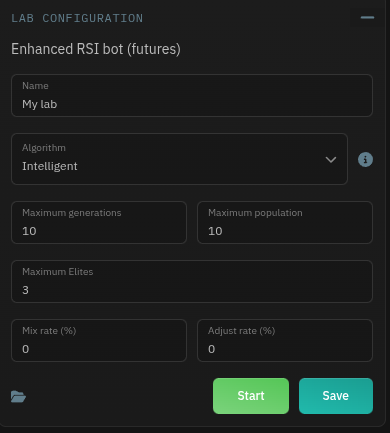 | Setting | What it controls |
| --- | --- |
| Maximum generations | How many evolutionary cycles to run |
| Maximum population | Number of configurations tested per generation |
| Maximum Elites | Number of top performers used as the base for the next generation. Elites are mutated (based on Adjust rate) and, if Mix rate is above 0, bred with another elite or a random result to produce the next population |
| Mix rate (%) | Probability of combining parameters from two parent configurations (0-100) |
| Adjust rate (%) | Probability of randomly mutating a parameter value (0-100) |
Higher populations and generations produce more thorough results but take longer. For most use cases, the defaults are a reasonable starting point.
General Settings:
| Setting | Description |
|---|---|
| Account | Exchange account for the backtests |
| Market | Trading pair |
| Position mode (if Futures) | One-way or Hedge |
| Margin mode (if Futures) | Cross or Isolated |
| Leverage (if Futures) | Leverage multiplier (1x to max) |
Parameters
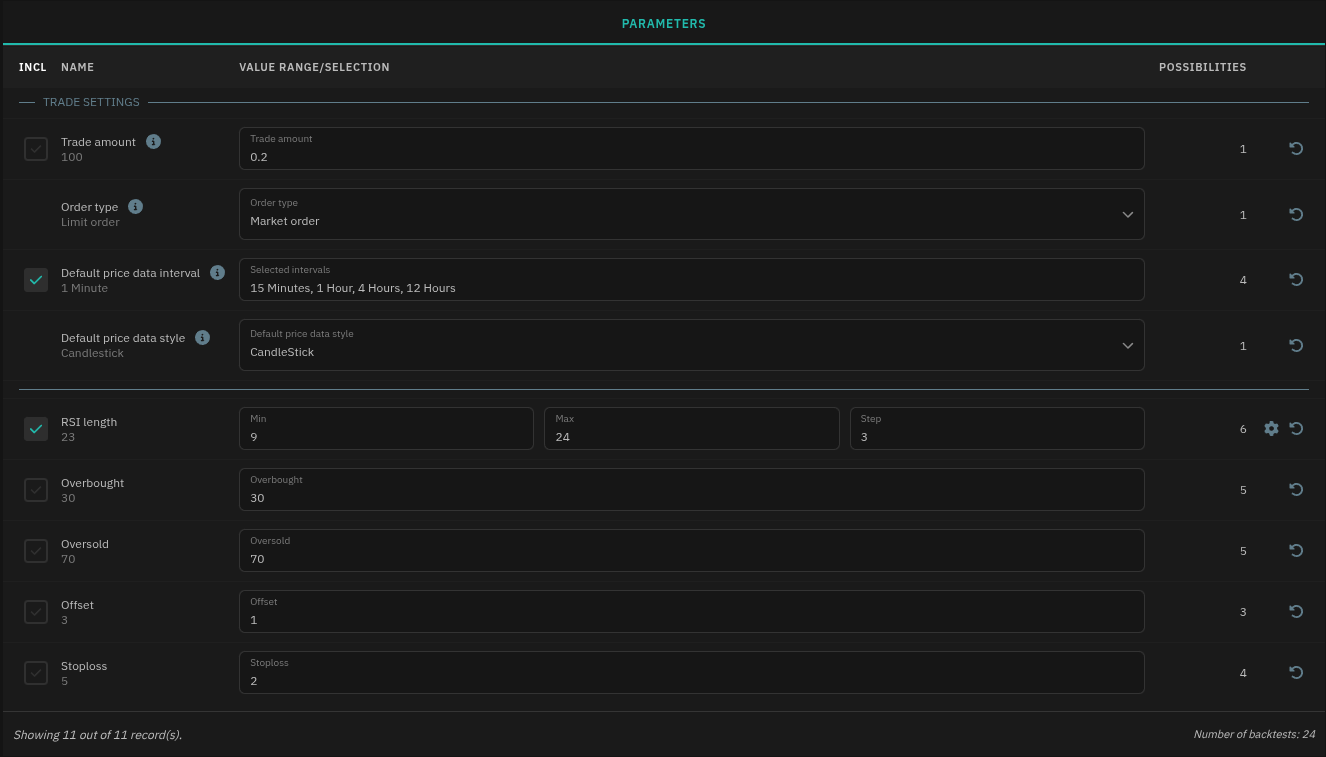 The Parameters panel lists every configurable setting from your script, organized into sections (Trade Settings, Strategy Parameters, etc.). Each parameter row shows:
| Column | Purpose |
|---|---|
| INCL | Toggle to include or exclude this parameter from the sweep |
| NAME | Parameter name |
| VALUE RANGE/SELECTION | Define the values to sweep |
| POSSIBILITIES | How many variations this parameter contributes |
A parameter can be either:
- Fixed -- one value, no variation. The lab uses this value in every backtest.
- Range/Specific -- either a min, max, and step, or a set of specific values. Can be set by clicking the parameter's cogwheel.
- Multi-select -- choose specific values from a list (e.g., select "15 Minutes, 1 Hour, 4 Hours, 12 Hours" from available intervals)
The footer shows the total number of backtests the lab will run, calculated as the product of all parameter possibilities. In the example above, 4 timeframes × 6 RSI values = 24 backtests using BruteForce. This number updates live as you adjust parameters, so you can manage the scope. Intelligent algorithm shows the Maximum Population × Maximum Generations.
When to Use Which Algorithm
Use Brute Force when:
- The total number of backtests is manageable (under a few hundred)
- You need definitive results with no gaps
- You are optimizing a small number of parameters
Use Intelligent when:
- The parameter space is large (thousands of combinations)
- You want a fast approximation
- You are exploring broadly and plan to do a finer sweep later
Running and Monitoring
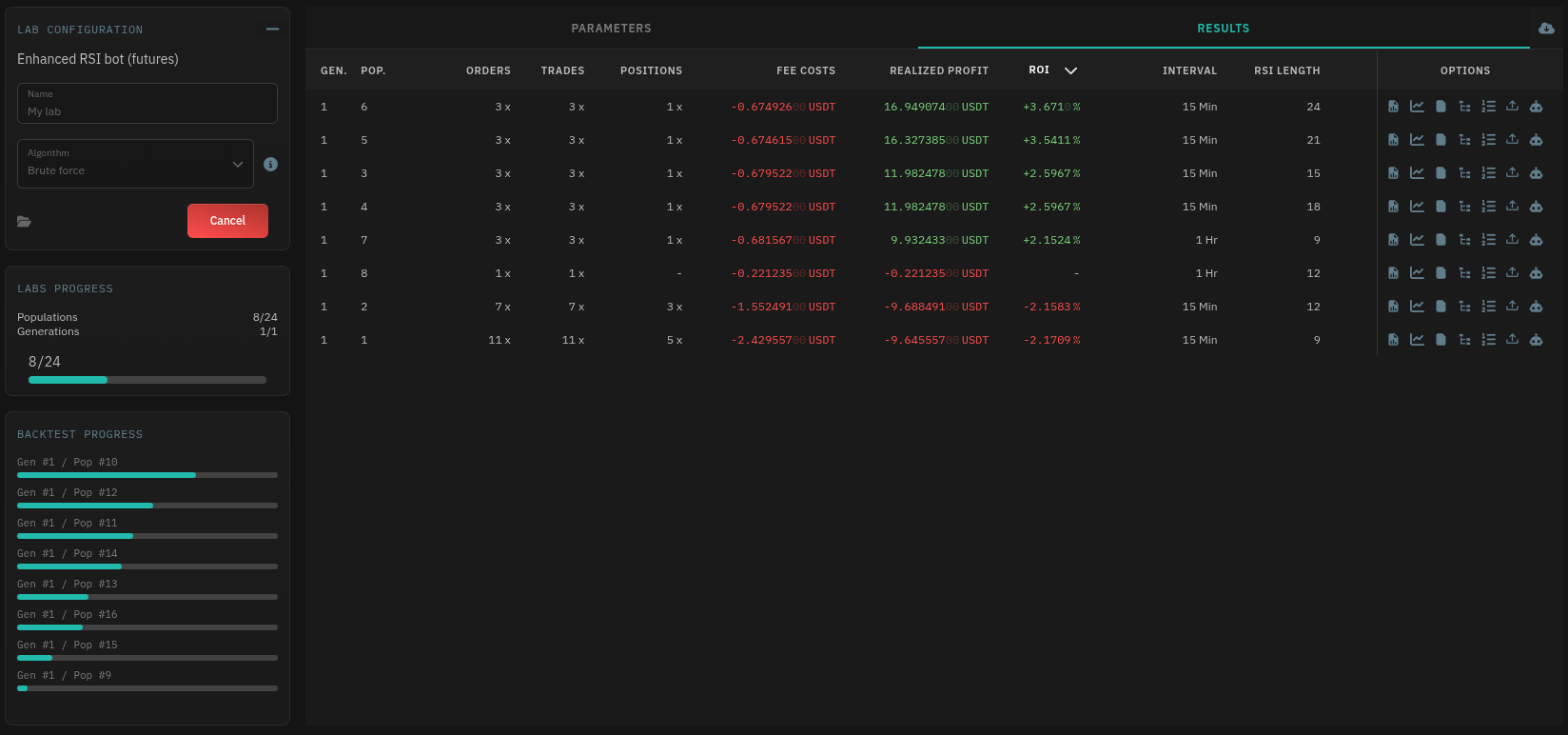 Click the green Start button to begin. The lab runs backtests in parallel:
- Labs Progress -- shows overall completion (populations tested, generations run) with a progress bar
- Backtest Progress -- individual backtest status bars for each population in the current generation
- Cancel -- the red Cancel button stops the run early, preserving any completed results
Reading Results
The results table lists every completed backtest ranked by performance. Key columns:
| Column | Description |
|---|---|
| GEN / POP | Generation and population number (for Intelligent algorithm) |
| ORDERS / TRADES / POSITIONS | Activity counts |
| FEE COSTS | Total fees incurred |
| REALIZED PROFIT | Net profit after fees |
| ROI | Return on investment (percentage) |
| Parameter columns | The values used in that backtest (e.g., Interval, RSI Length) |
ROI values are color-coded: green for positive, red for negative. Sort and scan the table to find which parameter combinations performed best. All results can also be downloaded as a single CSV file.
Result Options
Each row in the results table has an Options column. Hover over the icons to access:
| Icon | Action |
|---|---|
| Report | Detailed results overview for this backtest |
| Chart | Candlestick chart with plotted indicators and trade markers |
| Log | Timestamped execution log with all script actions |
| Positions | Individual position records (entry, exit, profit, etc) |
| Orders | Every order placed during the backtest |
| Export settings | Opens a JSON popup of the exact parameter configuration. Download or copy it for import into a bot or the script editor |
| Create bot | Takes the configuration and creates a trade bot from it directly |
The Create bot action is the end goal. Once you identify the best parameters, clone them directly into a live or simulated bot with one click -- no manual re-entry of settings.
Practical Tips
Start small, then expand. Do a coarse sweep with wider parameter steps first (e.g., SMA length 10 to 50, step 10). Then narrow into the best performing range with finer steps.
Watch the backtest count. Each additional parameter range multiplies the total. Sweeping 3 parameters with 4 values each already produces 64 backtests. Be selective about which parameters you vary.
Use fixed parameters strategically. Lock down parameters you are confident about and only sweep the ones where you are unsure. Every fixed parameter reduces the total backtest count.
Test across markets. Run the same lab on different trading pairs. A configuration that dominates on BTC/USDT may fail on a low-volume altcoin pair with different volatility.
Save before starting. Click Save before running the lab. If you want to revisit a configuration or tweak it later, you will not have to rebuild it from scratch.