Create your first Visual HaasScripts using "TradeBotContainer"
Create Your First Visual HaasScript
This walkthrough builds a complete trading bot using the TradeBotContainer — the simplest way to assemble a strategy from ready-made indicator, safety, and insurance nodes. When you are done, you will have a working bot that enters and exits trades based on RSI and moving average signals, protected by stop-losses and safety rules.
The Architecture
The bot is structured around three containers that feed into a central TradeBotContainer:
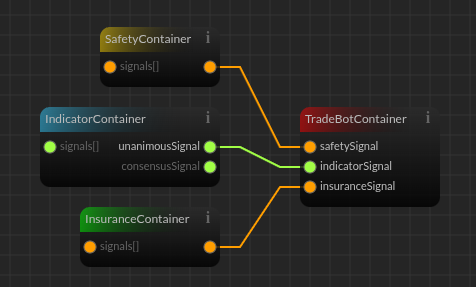 Each container aggregates signals from its category. TradeBotContainer evaluates them in order: safeties first (exit if triggered), then indicators (trade if insurances agree).
Step by Step
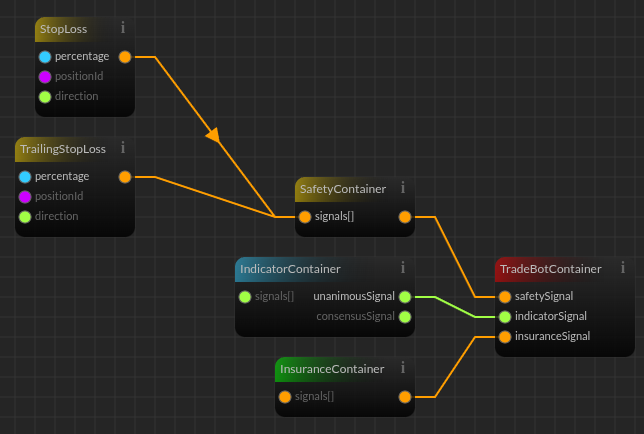
1. Add the Safety Nodes
Drag two nodes onto the canvas:
- StopLoss — accepts a percentage. When price moves against your position by this amount, a safety signal fires.
- TrailingStopLoss — accepts a percentage. Trails the price and fires when it retraces by the set amount.
Both nodes output a boolean (orange wire). Connect their outputs to a SafetyContainer node.
 ### 2. Add the Indicator Nodes
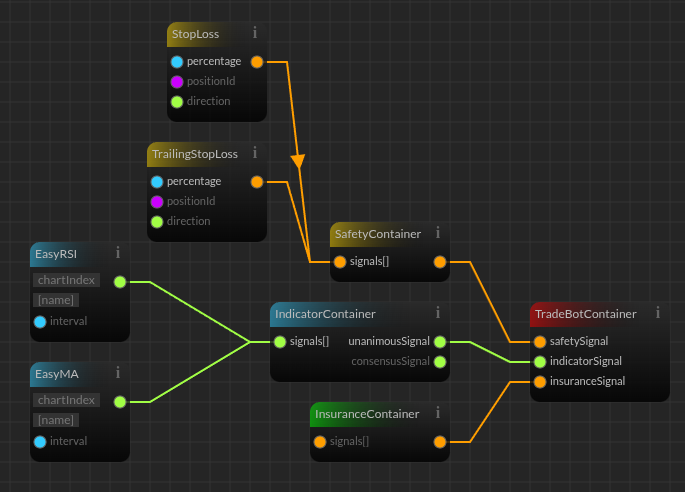
Drag two Easy indicator nodes onto the canvas:
- EasyRSI — generates buy and sell signals based on RSI overbought/oversold levels. Configure the chart index, name, and interval directly on the node or via inputs.
- EasyMA — generates signals when a fast moving average crosses above or below a slow moving average.
Easy indicators output an enum signal (green wire) — SignalLong, SignalShort, or SignalNone. Connect both to an IndicatorContainer node.
The IndicatorContainer has three outputs:
| Output | Behavior |
|---|---|
| signals[] | The raw list of all indicator signals |
| unanimousSignal | The signal only when all indicators agree |
| consensusSignal | The majority signal |
For this bot, connect unanimousSignal — the bot only trades when both RSI and MA agree on the direction.
 ### 3. Add the Insurance Nodes
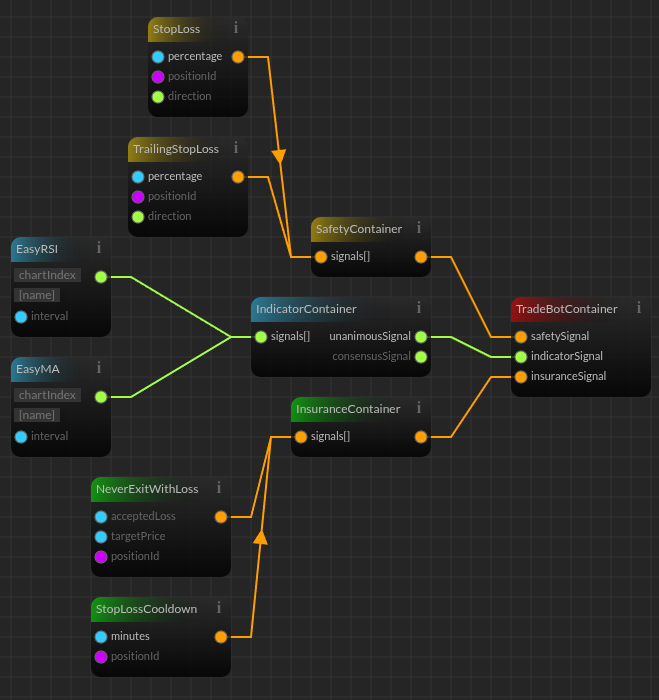
Drag two insurance nodes onto the canvas:
- NeverExitWithLoss — accepts an accepted loss percentage. Prevents the bot from exiting a position at a loss, overriding indicator exit signals when the position is negative.
- StopLossCooldown — accepts a number of minutes. After a stop-loss triggers, the bot waits this long before entering new trades.
Both output a boolean (orange wire). Connect them to an InsuranceContainer node. The InsuranceContainer returns true only when all insurance signals agree.
4. Connect Everything to TradeBotContainer
Drag the TradeBotContainer node onto the canvas. It has three inputs:
| Input | Wire Color | From |
|---|---|---|
| safetySignal | Orange | SafetyContainer output |
| indicatorSignal | Green | IndicatorContainer output (unanimousSignal) |
| insuranceSignal | Orange | InsuranceContainer output |
Connect each container output to its corresponding TradeBotContainer input.
 ### 5. How It Works
When the bot runs:
- Safeties are checked first. If StopLoss or TrailingStopLoss triggers, the bot exits the position immediately regardless of what indicators say.
- If no safeties are active, the bot evaluates the indicator signal. If RSI and MA both agree on a direction (unanimous), that signal is the intended trade.
- Insurances are checked last. If NeverExitWithLoss or StopLossCooldown disagrees, the trade is blocked. If all insurances agree, the trade executes.
This three-layer check ensures the bot trades only when both market conditions and risk rules align.
Configuring Parameters
Each node's parameters can be set inline when you right-click a dot and select "Change to field". This removes the connection requirement and converts it to an inline field you can click and write the value into directly. Convert all following dots into fields and write these values:
- StopLoss percentage — e.g., 5 for a 5% stop-loss
- TrailingStopLoss percentage — e.g., 7 for a 7% trailing stop
- EasyRSI interval — e.g., 15 for 15-minute candles
- EasyMA interval — e.g., 15
- NeverExitWithLoss accepted loss — a positive number (is 0 by default). This is an optional parameter.
- StopLossCooldown minutes — e.g., 300 for a 5-hour cooldown
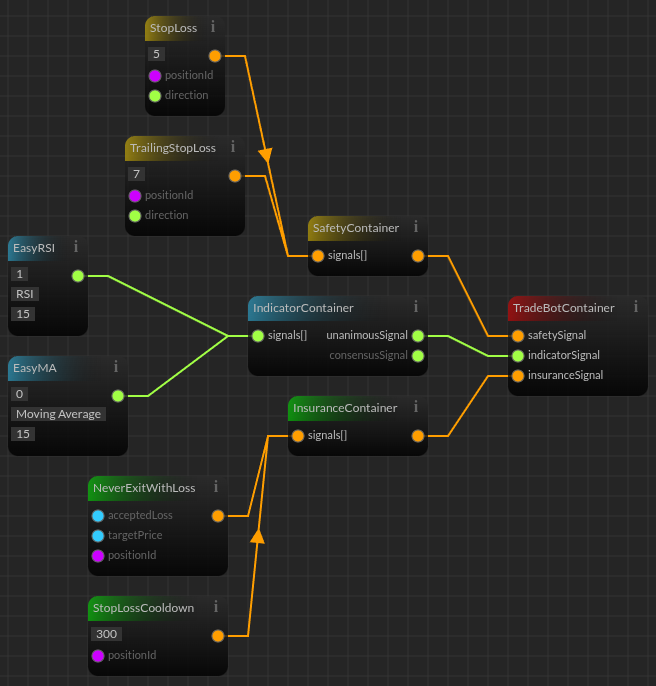
The values you set depend on your strategy, the market, and your risk tolerance. The same parameters that exist in code-based scripts exist here — the difference is you set them by clicking nodes instead of typing variable assignments.