More Control
Working with Raw Indicators and Manual Trade Commands
The previous page used Easy indicators that output trading signals directly and containers that handle entry and exit logic. That approach is not just for beginners — with signal manipulation commands like DelaySignal, SignalMapper, and IgnoreSignalIf, you can transform and filter signals extensively before they reach the containers.
This page covers a different way to build: using raw indicators that output numbers and wiring trade commands yourself. Both approaches give you full control. The difference is what level you work at — signals or values.
Signal-Level vs Value-Level
| Aspect | Signal-Level (Easy + Containers) | Value-Level (Raw + Manual) |
|---|---|---|
| Indicators | EasyRSI, EasyMA → output enum signals | RSI, MA → output numbers |
| Manipulation | DelaySignal, SignalMapper, IgnoreSignalIf | Compare, math operations, logic gates |
| Trade execution | TradeBotContainer handles entries and exits | You wire DoLong, DoShort, DoExitPosition |
| Safeties | Same nodes, fed into SafetyContainer | Same nodes, you wire the exit response |
Signal-level means you think in terms of trading signals — transform them, delay them, suppress them — and containers handle execution. Value-level means you work with raw numbers, build comparisons yourself, and wire each action to its trigger.
Example: RSI Strategy Without EasyRSI
The EasyRSI node internally compares RSI against overbought and oversold thresholds and outputs a signal. With the raw RSI node, you get a number — the RSI value — and you decide what to do with it.
A simple flow:
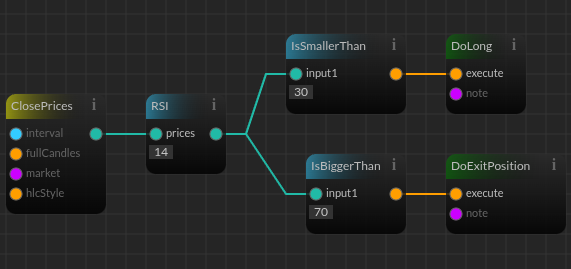 What each node does:
| Node | Output | Wire Color |
|---|---|---|
| ClosePrices | A collection of closing prices | Teal (ListNumber) |
| RSI | A number — the RSI values for the given period | Teal (ListNumber) |
| IsSmallerThan 30 | A boolean — true when RSI is below 30 | Orange (Boolean) |
| DoLong | Places a long order when its input is true | — |
This is fundamentally different from EasyRSI. EasyRSI hides the comparison and just gives you a signal. By wiring it yourself, you can:
- Use any threshold, not just the default overbought/oversold values
- Combine RSI with other conditions before deciding
- Add different actions for different RSI ranges (e.g., scale in at multiple levels)
- Insert delays, cooldowns, or other logic between the indicator and the trade
Wiring Safeties Manually
With TradeBotContainer, safeties automatically trigger an exit. Without it, you wire the exit yourself.
A stop-loss flow:
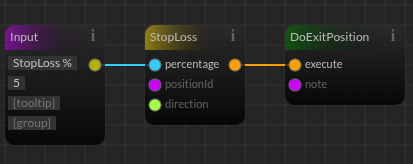 When the StopLoss node returns true (price dropped 5%), the DoExitPosition node fires and closes the position. You can add conditions — for example, only fire the exit if the position has been open for more than a certain number of intervals, or only if a secondary condition confirms.
Adding Manual Insurance Logic
In the container approach, insurances either block the trade or allow it. Manually, you can make more nuanced decisions.
For example, instead of NeverExitWithLoss blocking all exits, you could wire:
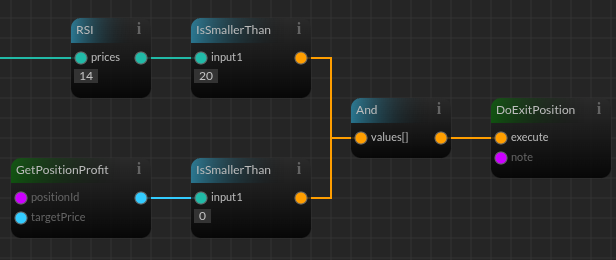 This exits a losing position only when RSI is also extremely oversold — a more targeted rule than "never exit at a loss."
When to Choose Which Level
Signal-level fits when:
- You think in terms of trade signals (long, short, exit, none) rather than numeric thresholds
- You want to delay, remap, or conditionally ignore signals without rewriting the comparison logic
- You are combining multiple indicators and want containers to handle merging and priority
- You want fewer nodes — signal manipulation is more concise than equivalent comparator chains
Value-level fits when:
- You need to act on specific numeric values (e.g., enter when RSI < 30, exit when RSI > 70 but also < 75)
- You are combining a numeric indicator with a non-signal condition (e.g., RSI + volume spike)
- Your exit logic does not follow the safety-first priority model built into TradeBotContainer
- You are scaling in or out at multiple price levels rather than entering once per signal
Both levels can achieve the same results. A SignalMapper that converts SignalLong to SignalNone under certain conditions is equivalent to a comparator that suppresses a DoLong. Choose the level that maps more naturally to how you think about your strategy.
Start with signals. If you find yourself thinking "I need to check the exact RSI value here, not just whether it crossed a threshold" — that is when value-level makes more sense.